Administrator & Analytics User Guide: Snowflake CDC Connector for Jira
This guide shows you how to connect Jira Cloud to Snowflake in under 2 minutes with 1-click keypair generation inside Jira, pick your projects and custom fields, verify replicated tables (including epic hierarchy), and run both pre-built SQL queries and Snowflake Cortex Analyst natural-language analytics.
Customer Cost & Governance Notice: Requires an active Snowflake account (billed separately by Snowflake). You are responsible for setting up, securing, and paying for your Snowflake account, virtual warehouse size (XSMALLor larger),AUTO_SUSPENDandAUTO_RESUMEsettings, compute credits, storage fees (including Time Travel and Fail-safe), Cortex Analyst usage, permissions, network policies, and data deletion in Snowflake. Deleting or archiving an issue in Jira Cloud does not delete historical rows already stored in Snowflake.
What You Get Right Away
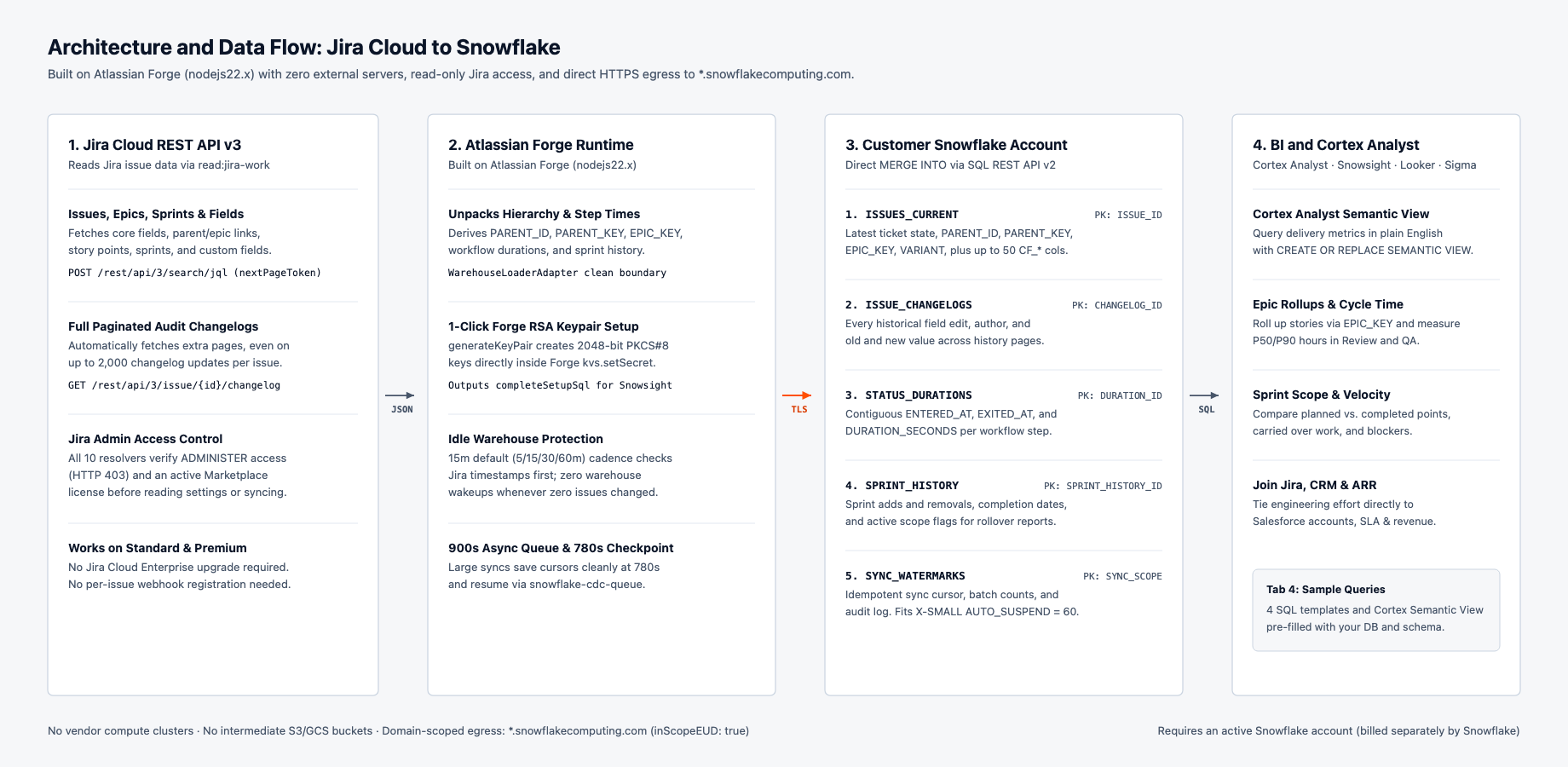
- Under 2 Minutes Setup Inside Jira: Generate your 2048-bit RSA keypair with one click inside Jira Administration and paste the complete pre-filled SQL setup script into a Snowsight worksheet. No
opensslterminal steps required for most teams. - Works on Jira Cloud Standard, Premium & Enterprise: Copies issues, epic and parent hierarchy (
PARENT_ID,PARENT_KEY,EPIC_KEY), custom fields, full paginated changelogs (automatically paginating oldest-first fromstartAt=0via/rest/api/3/issue/{id}/changelogwhenever Jira's inlinesearch/jqlchangelog window is exceeded), workflow dwell times, and sprint history usingread:jira-work. - Built on Atlassian Forge With Zero External Servers: Executes on Atlassian Forge (
nodejs22.x) and sendsMERGE INTOSQL statements straight to your approved*.snowflakecomputing.comhostname. - Five Clean SQL Tables Maintained Automatically:
"ISSUES_CURRENT": Latest ticket fields,PARENT_ID,PARENT_KEY,EPIC_KEY,STORY_POINTS,LABELS,CUSTOM_FIELDS(VARIANT), and up to 50 promoted"CF_*"columns."ISSUE_CHANGELOGS": Every field change with author account ID and old and new values."STATUS_DURATIONS": Workflow step durations (ENTERED_AT,EXITED_AT,DURATION_SECONDS,IS_CURRENT) for cycle time and bottleneck reporting."SPRINT_HISTORY": Active and historical sprint assignments, completion dates, and sprint scope additions and removals."SYNC_WATERMARKS": Sync cursor timestamp, row totals, and error status log.
- Snowflake Cortex Analyst Semantic View + 4 Personalized SQL Queries: Ready out of the box in Tab 4 (
Sample Queries).
Step 1: Connect Snowflake & Generate Your Key in 1 Click (Connection Tab)
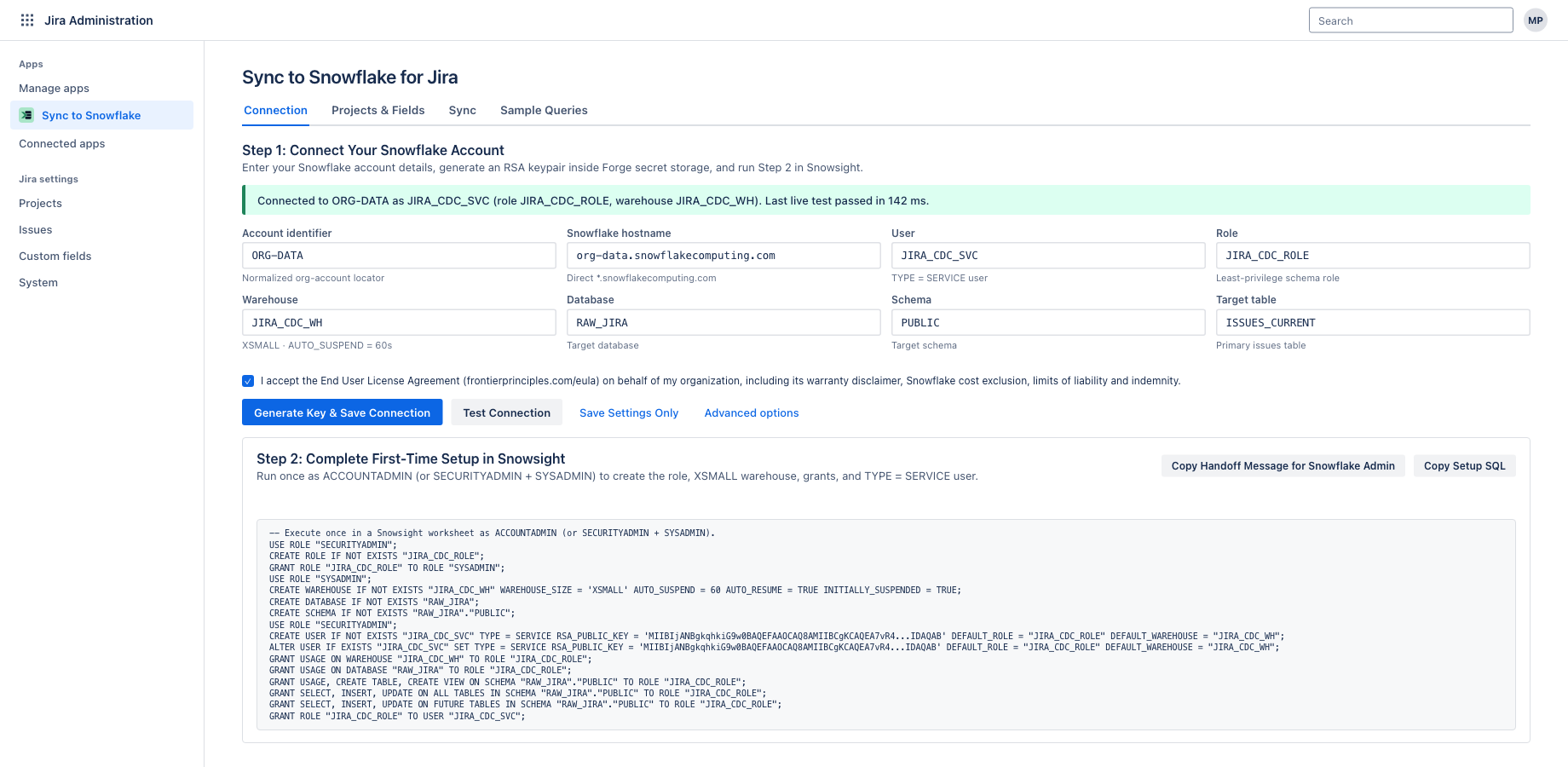
Prerequisites: You must hold Jira Administer Jira (ADMINISTER) global permission (HTTP 403otherwise) and have an active Atlassian Marketplace license (HTTP 402enforced in production).
- Open Jira Administration > Apps > Snowflake CDC Connector for Jira. The progress bar at the top walks through all four steps (
1. Connect Snowflake,2. Choose Data,3. Sync Status,4. Sample Queries). - Approve the app's domain-scoped
*.snowflakecomputing.compermissions during Marketplace installation if prompted. - On Tab 1 (
Connection):- Enter Target Details: Fill in your Account Identifier, Snowflake Hostname (ending in
.snowflakecomputing.comwith nohttps://, port, or path), Service User (JIRA_CDC_SVC), Role (JIRA_CDC_ROLE), Warehouse (JIRA_CDC_WH), Database (RAW_JIRA), Schema (PUBLIC), and Primary Table (ISSUES_CURRENT). - Click
Generate Key & Save Connection: Atlassian Forge generates an unencrypted 2048-bit PKCS#8 RSA keypair inside the Forge runtime (node:crypto), saves the private key straight into Forge encrypted secret storage (kvs.setSecret), and immediately shows your Complete Snowflake Setup SQL pre-filled with your exact role,XSMALLwarehouse, database, schema, service user, and public RSA key. - Run the Pre-Filled SQL in Snowsight (or Delegate): Copy the Complete Snowflake Setup SQL block (or click Copy Handoff Message for Snowflake Admin if another team administers Snowsight), open a Snowsight worksheet as
ACCOUNTADMIN(orSECURITYADMIN+SYSADMIN), and run it once. That single paste creates the role,XSMALLauto-suspending warehouse, database, schema, grants, andTYPE = SERVICEuser withRSA_PUBLIC_KEYalready attached. - Click
Test Connection: Back in Jira, click Test Connection to confirm Snowflake accepts yourKEYPAIR_JWTtoken and verify Snowflake version, active role, warehouse, and response latency.
- Enter Target Details: Fill in your Account Identifier, Snowflake Hostname (ending in
Security Note: Private keys generated in Forge are stored via kvs.setSecret and never leave Atlassian encrypted storage or appear in the browser UI.
Step 2: Choose Projects & Fields (Projects & Fields Tab)
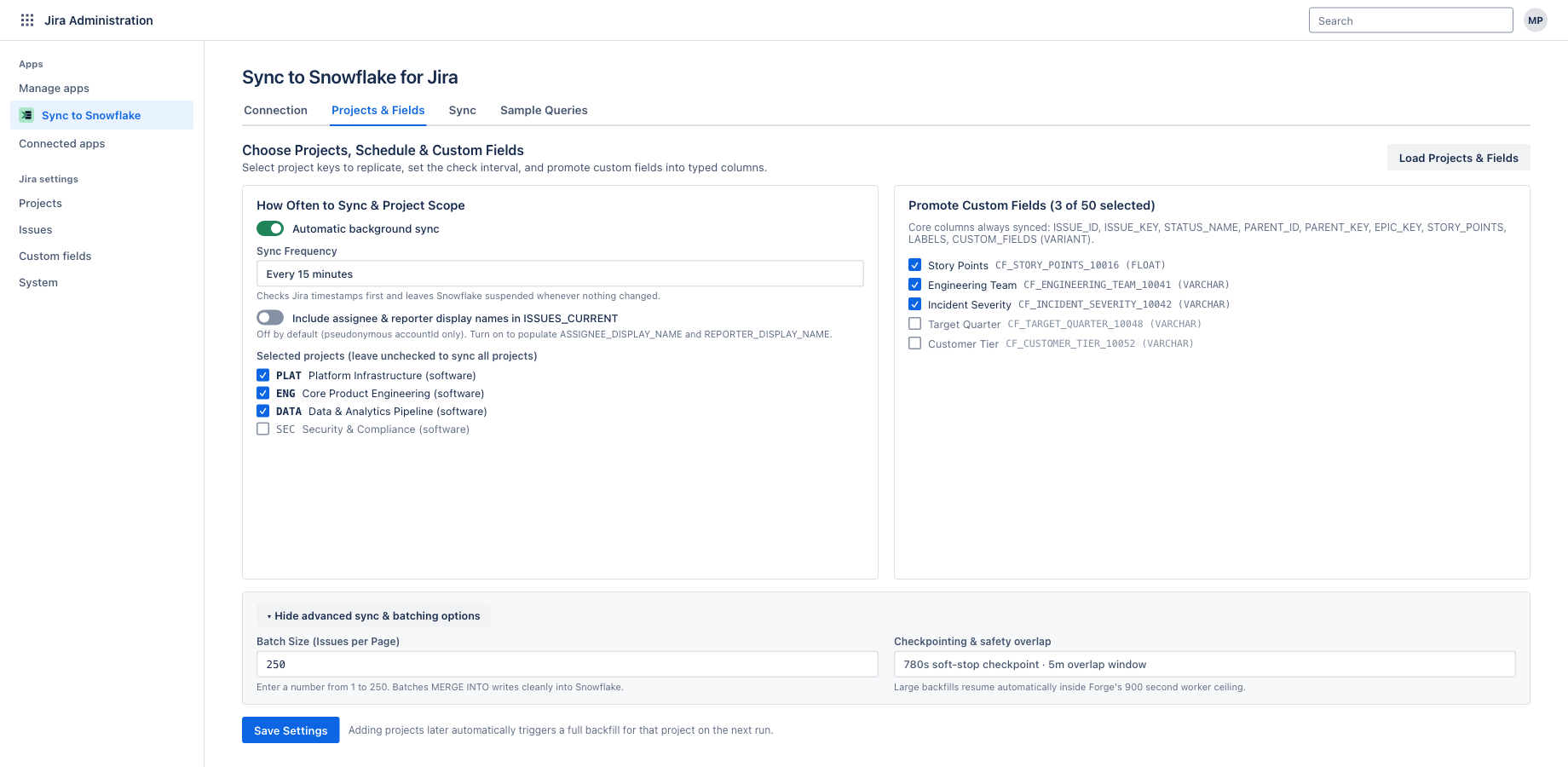
Open Tab 2 (Projects & Fields):
- Which Projects to Sync: Click Load Projects & Fields to load accessible Jira projects and custom fields. Check specific projects to sync, or leave all unchecked to synchronize every accessible Jira project automatically.
- How Often to Sync:
- Toggle Automatic background sync (
ONby default). - Pick Every 5, 15 (recommended default), 30, or 60 minutes. Background checks query Jira timestamps first and leave your Snowflake warehouse asleep whenever nothing changed.
- Toggle Include assignee & reporter display names in ISSUES_CURRENT on if you want human-readable names populated (
ASSIGNEE_DISPLAY_NAME,REPORTER_DISPLAY_NAME) for executive BI reports and Cortex Analyst prompts (off by default so user columns remain pseudonymousaccountIdvalues). - Optionally expand Advanced sync & batching options to adjust the batch size (
1to250). - Click Save Settings.
- Toggle Automatic background sync (
- Built-In Hierarchy + Extra Custom Fields as Columns:
"ISSUES_CURRENT"automatically populatesPARENT_ID,PARENT_KEY, andEPIC_KEYfor parent/epic rollups, and writes every custom field intoCUSTOM_FIELDS(VARIANT).- Check up to 50 custom fields in the table to promote them into dedicated typed columns (
CF_<NAME>_<ID>asFLOAT,TIMESTAMP_TZ,VARCHAR, orVARIANT) viaALTER TABLE ... ADD COLUMN IF NOT EXISTS.
Step 3: Run Sync & Inspect Your Tables (Sync Tab)
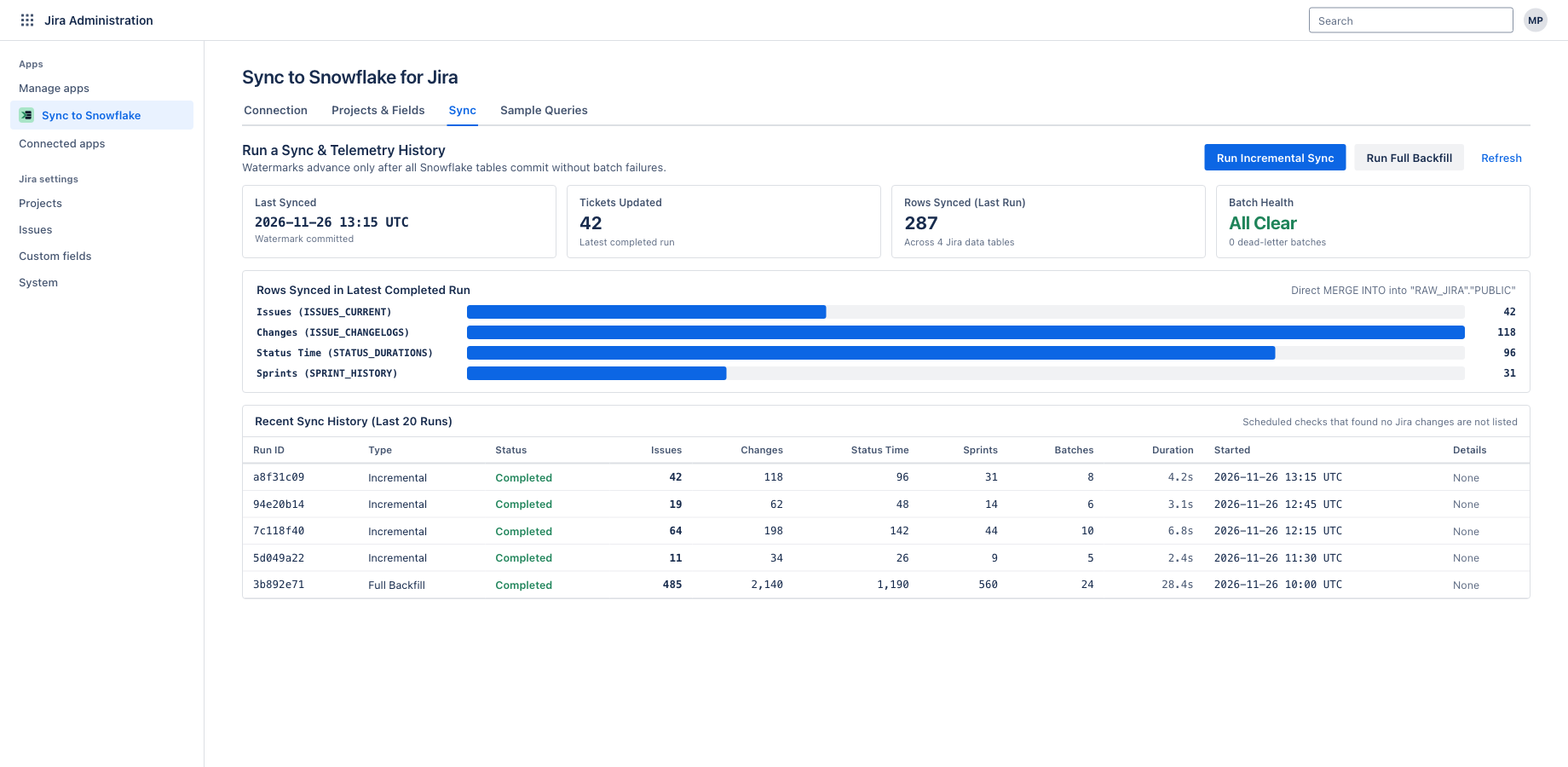
Open Tab 3 (Sync):
- Sync Summary: Check your last synced timestamp, updated ticket count, recent runs shown (last 20 runs), and batch health (
All clearorCheck errors, with Dismiss Resolved Errors inside any resolved failed-batch banner). - Run a Sync & Inspect Tables: Click Run Full Backfill on first setup to create and load
"ISSUES_CURRENT"(withPARENT_ID,PARENT_KEY,EPIC_KEY),"ISSUE_CHANGELOGS","STATUS_DURATIONS","SPRINT_HISTORY", and"SYNC_WATERMARKS". Compare Rows Synced in Latest Run across tables in the bar chart. - Incremental Updates, Safety Overlap, Manual Lock Clearing & Auto Pause:
- Subsequent scheduled checks and Run Incremental Sync runs use a 5-minute overlap window around the committed watermark so concurrent edits are never missed, and long syncs checkpoint cleanly at
780seconds inside Forge's900second worker ceiling. - If a background run ever stalls and keeps the sync controls locked, use Clear Sync Lock on the Sync tab to clear the lock manually and return to normal syncing.
- If 5 consecutive sync runs fail (for example because of an expired Snowflake key or paused role), the app automatically pauses scheduled background syncs (
autoPausedReasonbanner shown in Jira) to avoid repeated failed runs. Fix the cause, re-enable Automatic background sync on Projects & Fields, and click Save Settings.
- Subsequent scheduled checks and Run Incremental Sync runs use a 5-minute overlap window around the committed watermark so concurrent edits are never missed, and long syncs checkpoint cleanly at
Step 4: Sample Queries & Snowflake Cortex Analyst (Sample Queries Tab)
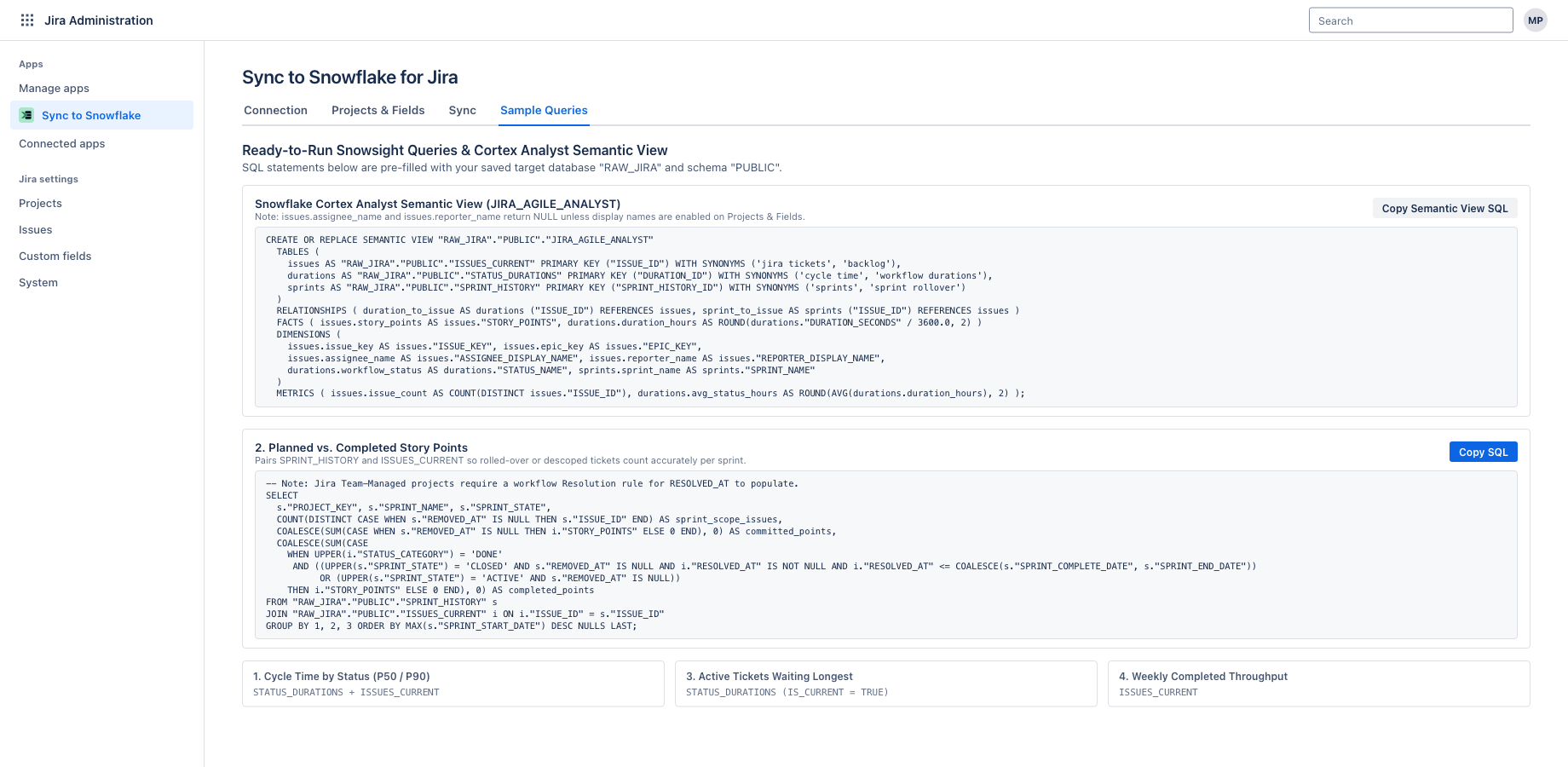
Open Tab 4 (Sample Queries) inside Jira Administration. Every query and the Snowflake Cortex Analyst Semantic View DDL below automatically fill in your saved "DATABASE"."SCHEMA" inside Jira.
Ask Plain-English Delivery Questions With Snowflake Cortex Analyst
Paste the generated Snowflake Cortex Analyst Semantic View SQL from Tab 4 into a Snowsight worksheet once (replacing "RAW_JIRA"."PUBLIC" if your database or schema differs):
CREATE OR REPLACE SEMANTIC VIEW "RAW_JIRA"."PUBLIC"."JIRA_AGILE_ANALYST"
  TABLES (
    issues AS "RAW_JIRA"."PUBLIC"."ISSUES_CURRENT"
      PRIMARY KEY ("ISSUE_ID")
      WITH SYNONYMS ('jira tickets', 'jira issues', 'backlog')
      COMMENT = 'Current Jira issue state with parent and epic hierarchy',
    durations AS "RAW_JIRA"."PUBLIC"."STATUS_DURATIONS"
      PRIMARY KEY ("DURATION_ID")
      WITH SYNONYMS ('cycle time', 'workflow durations', 'time in status')
      COMMENT = 'Time each Jira issue spent in each workflow status',
    sprints AS "RAW_JIRA"."PUBLIC"."SPRINT_HISTORY"
      PRIMARY KEY ("SPRINT_HISTORY_ID")
      WITH SYNONYMS ('sprints', 'sprint assignments', 'sprint rollover')
      COMMENT = 'Sprint scope, completions, and carry over history per issue'
  )
  RELATIONSHIPS (
    duration_to_issue AS durations ("ISSUE_ID") REFERENCES issues,
    sprint_to_issue AS sprints ("ISSUE_ID") REFERENCES issues
  )
  FACTS (
    issues.story_points AS issues."STORY_POINTS"
      COMMENT = 'Estimated story points for the issue',
    durations.duration_hours AS ROUND(durations."DURATION_SECONDS" / 3600.0, 2)
      COMMENT = 'Hours spent inside a workflow status'
  )
  DIMENSIONS (
    issues.issue_key AS issues."ISSUE_KEY",
    issues.project_key AS issues."PROJECT_KEY",
    issues.issue_type AS issues."ISSUE_TYPE",
    issues.status_name AS issues."STATUS_NAME",
    issues.status_category AS issues."STATUS_CATEGORY",
    issues.priority_name AS issues."PRIORITY_NAME",
    issues.assignee_name AS issues."ASSIGNEE_DISPLAY_NAME",
    issues.reporter_name AS issues."REPORTER_DISPLAY_NAME",
    issues.parent_key AS issues."PARENT_KEY",
    issues.epic_key AS issues."EPIC_KEY",
    issues.created_at AS issues."CREATED_AT",
    issues.resolved_at AS issues."RESOLVED_AT",
    durations.workflow_status AS durations."STATUS_NAME",
    durations.is_current_status AS durations."IS_CURRENT",
    durations.entered_at AS durations."ENTERED_AT",
    durations.exited_at AS durations."EXITED_AT",
    sprints.sprint_name AS sprints."SPRINT_NAME",
    sprints.sprint_state AS sprints."SPRINT_STATE",
    sprints.is_active_in_sprint AS sprints."IS_ACTIVE_IN_SPRINT"
  )
  METRICS (
    issues.issue_count AS COUNT(DISTINCT issues."ISSUE_ID")
      COMMENT = 'Total count of unique Jira issues',
    issues.total_story_points AS COALESCE(SUM(issues.story_points), 0)
      COMMENT = 'Sum of story points across selected issues',
    durations.avg_status_hours AS ROUND(AVG(durations.duration_hours), 2)
      COMMENT = 'Average hours spent in a workflow status'
  )
  COMMENT = 'Jira agile delivery, hierarchy, cycle time, and sprint analytics semantic view for Snowflake Cortex Analyst';
Once created in Snowflake, product managers and engineering VPs can ask Cortex Analyst questions in plain English inside Snowsight or Snowflake Intelligence, such as:
- "Which epics (
EPIC_KEY) in each project have the most open story points?" - "What is the average status hours spent in In Progress and In Review by issue type?"
- "Compare active issues and story points across recent sprints."
- "Which open tickets have the longest current wait time?"
Display Names Note:issues.assignee_nameandissues.reporter_namereturnNULLunless Include assignee & reporter display names in ISSUES_CURRENT is enabled on the Projects & Fields tab.
Related deep dives:
- Jira Time in Status & Cycle Time in Snowflake SQL
- Query Jira Epics, Sprints & Cycle Time with Snowflake Cortex Analyst
Four Pre-Built SQL Queries Included in Tab 4
Replace "RAW_JIRA"."PUBLIC" below only when copying directly from this guide instead of the pre-filled Sample Queries tab inside Jira.
1. Typical Hours Spent in Active Work (Cycle Time)
SELECT
  i."PROJECT_KEY",
  i."ISSUE_TYPE",
  COUNT(DISTINCT d."ISSUE_ID") AS issues_measured,
  ROUND(AVG(d."DURATION_SECONDS") / 3600.0, 2) AS avg_hours,
  ROUND(MEDIAN(d."DURATION_SECONDS") / 3600.0, 2) AS p50_hours,
  ROUND(PERCENTILE_CONT(0.90) WITHIN GROUP (ORDER BY d."DURATION_SECONDS") / 3600.0, 2) AS p90_hours
FROM "RAW_JIRA"."PUBLIC"."STATUS_DURATIONS" d
JOIN "RAW_JIRA"."PUBLIC"."ISSUES_CURRENT" i
  ON i."ISSUE_ID" = d."ISSUE_ID"
WHERE LOWER(d."STATUS_NAME") IN ('in progress', 'in development', 'in review')
  AND d."DURATION_SECONDS" IS NOT NULL
GROUP BY 1, 2
ORDER BY 1, p50_hours ASC;
2. Planned vs. Completed Story Points (Sprint Delivery)
-- Note: Jira Team-Managed projects require a workflow Resolution rule for RESOLVED_AT to populate.
SELECT
  s."PROJECT_KEY",
  s."SPRINT_NAME",
  s."SPRINT_STATE",
  COUNT(DISTINCT CASE WHEN s."REMOVED_AT" IS NULL THEN s."ISSUE_ID" END) AS sprint_scope_issues,
  COUNT(DISTINCT CASE
    WHEN UPPER(i."STATUS_CATEGORY") = 'DONE'
     AND (
       (UPPER(s."SPRINT_STATE") = 'CLOSED'
        AND s."REMOVED_AT" IS NULL
        AND i."RESOLVED_AT" IS NOT NULL
        AND i."RESOLVED_AT" <= COALESCE(s."SPRINT_COMPLETE_DATE", s."SPRINT_END_DATE")
        AND (s."SPRINT_START_DATE" IS NULL OR i."RESOLVED_AT" >= s."SPRINT_START_DATE"))
       OR (UPPER(s."SPRINT_STATE") = 'ACTIVE' AND s."REMOVED_AT" IS NULL)
     )
    THEN s."ISSUE_ID"
  END) AS completed_issues,
  COALESCE(SUM(CASE WHEN s."REMOVED_AT" IS NULL THEN i."STORY_POINTS" ELSE 0 END), 0) AS committed_points,
  COALESCE(SUM(CASE
    WHEN UPPER(i."STATUS_CATEGORY") = 'DONE'
     AND (
       (UPPER(s."SPRINT_STATE") = 'CLOSED'
        AND s."REMOVED_AT" IS NULL
        AND i."RESOLVED_AT" IS NOT NULL
        AND i."RESOLVED_AT" <= COALESCE(s."SPRINT_COMPLETE_DATE", s."SPRINT_END_DATE")
        AND (s."SPRINT_START_DATE" IS NULL OR i."RESOLVED_AT" >= s."SPRINT_START_DATE"))
       OR (UPPER(s."SPRINT_STATE") = 'ACTIVE' AND s."REMOVED_AT" IS NULL)
     )
    THEN i."STORY_POINTS" ELSE 0
  END), 0) AS completed_points,
  COUNT(DISTINCT CASE WHEN s."REMOVED_AT" IS NOT NULL THEN s."ISSUE_ID" END) AS descoped_issues
FROM "RAW_JIRA"."PUBLIC"."SPRINT_HISTORY" s
JOIN "RAW_JIRA"."PUBLIC"."ISSUES_CURRENT" i
  ON i."ISSUE_ID" = s."ISSUE_ID"
GROUP BY 1, 2, 3
ORDER BY MAX(s."SPRINT_START_DATE") DESC NULLS LAST;
3. Active Tickets Waiting Longest (Bottlenecks)
SELECT
  i."ISSUE_KEY",
  i."PARENT_KEY",
  i."EPIC_KEY",
  i."SUMMARY",
  d."STATUS_NAME" AS current_status,
  d."ENTERED_AT",
  ROUND(DATEDIFF('second', d."ENTERED_AT", CURRENT_TIMESTAMP()) / 86400.0, 1) AS days_in_status,
  COALESCE(i."ASSIGNEE_DISPLAY_NAME", i."ASSIGNEE_ACCOUNT_ID") AS assignee
FROM "RAW_JIRA"."PUBLIC"."STATUS_DURATIONS" d
JOIN "RAW_JIRA"."PUBLIC"."ISSUES_CURRENT" i
  ON i."ISSUE_ID" = d."ISSUE_ID"
WHERE d."IS_CURRENT" = TRUE
  AND UPPER(i."STATUS_CATEGORY") <> 'DONE'
ORDER BY days_in_status DESC
LIMIT 25;
4. Weekly Completed Stories and Bugs (Throughput)
SELECT
  DATE_TRUNC('week', "RESOLVED_AT")::DATE AS resolved_week,
  "PROJECT_KEY",
  COUNT(*) AS total_resolved,
  COUNT_IF("ISSUE_TYPE" = 'Story') AS stories,
  COUNT_IF("ISSUE_TYPE" = 'Bug') AS bugs,
  COALESCE(SUM("STORY_POINTS"), 0) AS shipped_story_points
FROM "RAW_JIRA"."PUBLIC"."ISSUES_CURRENT"
WHERE "RESOLVED_AT" IS NOT NULL
GROUP BY 1, 2
ORDER BY 1 DESC, 2;
Advanced Options: Bring Your Own PKCS#8 Key & Standalone Setup SQL
Most teams use Generate Key & Save Connection in Step 1 so no terminal commands are needed. If your security policy requires generating keys on an offline workstation or rotating keys manually, follow these steps:
Option A: Generate an Unencrypted PKCS#8 Key Pair (openssl)
openssl genrsa 2048 | openssl pkcs8 -topk8 -inform PEM -out snowflake_rsa_key.p8 -nocrypt
openssl rsa -in snowflake_rsa_key.p8 -pubout -out snowflake_rsa_key.pub
chmod 600 snowflake_rsa_key.p8
Expand Advanced options on the Connection tab, paste the contents of snowflake_rsa_key.p8, and click Save With Pasted Key. Then run the generated ALTER USER "JIRA_CDC_SVC" SET RSA_PUBLIC_KEY='...'; statement in Snowsight.
Option B: Complete Reference Snowflake Setup SQL Template
The 1-click flow in Connection fills these exact defaults with your database, schema, warehouse, role, user, and public key automatically:
-- ============================================================================
-- Snowflake CDC Connector for Jira
-- Idempotent Snowflake Setup Script
-- ============================================================================

USE ROLE "SECURITYADMIN";

CREATE ROLE IF NOT EXISTS "JIRA_CDC_ROLE"
  COMMENT = 'Role for Atlassian Forge Snowflake CDC Connector for Jira';

GRANT ROLE "JIRA_CDC_ROLE" TO ROLE "SYSADMIN";

USE ROLE "SYSADMIN";

CREATE WAREHOUSE IF NOT EXISTS "JIRA_CDC_WH"
  WAREHOUSE_SIZE = 'XSMALL'
  WAREHOUSE_TYPE = 'STANDARD'
  AUTO_SUSPEND = 60
  AUTO_RESUME = TRUE
  INITIALLY_SUSPENDED = TRUE
  STATEMENT_TIMEOUT_IN_SECONDS = 300
  COMMENT = 'XSMALL warehouse with 60 second auto suspend for scheduled Jira CDC loads';

CREATE DATABASE IF NOT EXISTS "RAW_JIRA"
  COMMENT = 'Flattened Jira Cloud CDC landing database';

CREATE SCHEMA IF NOT EXISTS "RAW_JIRA"."PUBLIC"
  COMMENT = 'Canonical flattened Jira Cloud CDC tables';

CREATE TABLE IF NOT EXISTS "RAW_JIRA"."PUBLIC"."ISSUES_CURRENT" (
  "ISSUE_ID" VARCHAR(64) NOT NULL,
  "ISSUE_KEY" VARCHAR(64) NOT NULL,
  "PROJECT_KEY" VARCHAR(64) NOT NULL,
  "PARENT_ID" VARCHAR(64),
  "PARENT_KEY" VARCHAR(64),
  "EPIC_KEY" VARCHAR(64),
  "SUMMARY" VARCHAR(16777216) NOT NULL,
  "ISSUE_TYPE" VARCHAR(255) NOT NULL,
  "STATUS_NAME" VARCHAR(255) NOT NULL,
  "STATUS_CATEGORY" VARCHAR(128) NOT NULL,
  "PRIORITY_NAME" VARCHAR(128),
  "ASSIGNEE_ACCOUNT_ID" VARCHAR(255),
  "REPORTER_ACCOUNT_ID" VARCHAR(255),
  "ASSIGNEE_DISPLAY_NAME" VARCHAR(255),
  "REPORTER_DISPLAY_NAME" VARCHAR(255),
  "STORY_POINTS" NUMBER(18, 4),
  "LABELS" ARRAY NOT NULL DEFAULT ARRAY_CONSTRUCT(),
  "CUSTOM_FIELDS" VARIANT NOT NULL DEFAULT OBJECT_CONSTRUCT(),
  "CREATED_AT" TIMESTAMP_TZ(6) NOT NULL,
  "UPDATED_AT" TIMESTAMP_TZ(6) NOT NULL,
  "RESOLVED_AT" TIMESTAMP_TZ(6),
  "SYNCED_AT" TIMESTAMP_TZ(6) NOT NULL,
  CONSTRAINT "PK_ISSUES_CURRENT_ISSUE_ID" PRIMARY KEY ("ISSUE_ID")
);

CREATE TABLE IF NOT EXISTS "RAW_JIRA"."PUBLIC"."ISSUE_CHANGELOGS" (
  "CHANGELOG_ID" VARCHAR(255) NOT NULL,
  "HISTORY_ID" VARCHAR(128) NOT NULL,
  "ISSUE_ID" VARCHAR(64) NOT NULL,
  "ISSUE_KEY" VARCHAR(64) NOT NULL,
  "PROJECT_KEY" VARCHAR(64) NOT NULL,
  "AUTHOR_ACCOUNT_ID" VARCHAR(255),
  "FIELD_ID" VARCHAR(255) NOT NULL,
  "FIELD_NAME" VARCHAR(255) NOT NULL,
  "FIELD_TYPE" VARCHAR(64) NOT NULL,
  "FROM_VALUE" VARCHAR(16777216),
  "FROM_STRING" VARCHAR(16777216),
  "TO_VALUE" VARCHAR(16777216),
  "TO_STRING" VARCHAR(16777216),
  "CREATED_AT" TIMESTAMP_TZ(6) NOT NULL,
  "SYNCED_AT" TIMESTAMP_TZ(6) NOT NULL,
  CONSTRAINT "PK_ISSUE_CHANGELOGS_CHANGELOG_ID" PRIMARY KEY ("CHANGELOG_ID")
);

CREATE TABLE IF NOT EXISTS "RAW_JIRA"."PUBLIC"."STATUS_DURATIONS" (
  "DURATION_ID" VARCHAR(255) NOT NULL,
  "ISSUE_ID" VARCHAR(64) NOT NULL,
  "ISSUE_KEY" VARCHAR(64) NOT NULL,
  "PROJECT_KEY" VARCHAR(64) NOT NULL,
  "STATUS_NAME" VARCHAR(255) NOT NULL,
  "STATUS_CATEGORY" VARCHAR(128),
  "SEQUENCE_ORDER" NUMBER(10, 0) NOT NULL,
  "ENTERED_AT" TIMESTAMP_TZ(6) NOT NULL,
  "EXITED_AT" TIMESTAMP_TZ(6),
  "DURATION_SECONDS" NUMBER(18, 3),
  "IS_CURRENT" BOOLEAN NOT NULL,
  "TRANSITION_AUTHOR_ACCOUNT_ID" VARCHAR(255),
  "SYNCED_AT" TIMESTAMP_TZ(6) NOT NULL,
  CONSTRAINT "PK_STATUS_DURATIONS_DURATION_ID" PRIMARY KEY ("DURATION_ID")
);

CREATE TABLE IF NOT EXISTS "RAW_JIRA"."PUBLIC"."SPRINT_HISTORY" (
  "SPRINT_HISTORY_ID" VARCHAR(255) NOT NULL,
  "ISSUE_ID" VARCHAR(64) NOT NULL,
  "ISSUE_KEY" VARCHAR(64) NOT NULL,
  "PROJECT_KEY" VARCHAR(64) NOT NULL,
  "SPRINT_ID" VARCHAR(128) NOT NULL,
  "SPRINT_NAME" VARCHAR(512) NOT NULL,
  "SPRINT_STATE" VARCHAR(64),
  "BOARD_ID" VARCHAR(128),
  "ADDED_AT" TIMESTAMP_TZ(6),
  "REMOVED_AT" TIMESTAMP_TZ(6),
  "SPRINT_START_DATE" TIMESTAMP_TZ(6),
  "SPRINT_END_DATE" TIMESTAMP_TZ(6),
  "SPRINT_COMPLETE_DATE" TIMESTAMP_TZ(6),
  "IS_ACTIVE_IN_SPRINT" BOOLEAN NOT NULL,
  "SYNCED_AT" TIMESTAMP_TZ(6) NOT NULL,
  CONSTRAINT "PK_SPRINT_HISTORY_ID" PRIMARY KEY ("SPRINT_HISTORY_ID")
);

CREATE TABLE IF NOT EXISTS "RAW_JIRA"."PUBLIC"."SYNC_WATERMARKS" (
  "SYNC_SCOPE" VARCHAR(255) NOT NULL,
  "LAST_JOB_ID" VARCHAR(128) NOT NULL,
  "LAST_STATUS" VARCHAR(32) NOT NULL,
  "WATERMARK_UPDATED_AT" TIMESTAMP_TZ(6) NOT NULL,
  "NEXT_PAGE_TOKEN" VARCHAR(4096),
  "ISSUES_SYNCED" NUMBER(18, 0) NOT NULL DEFAULT 0,
  "CHANGELOGS_SYNCED" NUMBER(18, 0) NOT NULL DEFAULT 0,
  "BATCHES_EXECUTED" NUMBER(18, 0) NOT NULL DEFAULT 0,
  "LAST_RUN_STARTED_AT" TIMESTAMP_TZ(6) NOT NULL,
  "LAST_RUN_FINISHED_AT" TIMESTAMP_TZ(6),
  "ERROR_MESSAGE" VARCHAR(16777216),
  "SYNCED_AT" TIMESTAMP_TZ(6) NOT NULL,
  CONSTRAINT "PK_SYNC_WATERMARKS_SCOPE" PRIMARY KEY ("SYNC_SCOPE")
);

-- Transfer table ownership so JIRA_CDC_ROLE can run schema evolution (ALTER TABLE ADD COLUMN)
GRANT OWNERSHIP ON TABLE "RAW_JIRA"."PUBLIC"."ISSUES_CURRENT" TO ROLE "JIRA_CDC_ROLE" COPY CURRENT GRANTS;
GRANT OWNERSHIP ON TABLE "RAW_JIRA"."PUBLIC"."ISSUE_CHANGELOGS" TO ROLE "JIRA_CDC_ROLE" COPY CURRENT GRANTS;
GRANT OWNERSHIP ON TABLE "RAW_JIRA"."PUBLIC"."STATUS_DURATIONS" TO ROLE "JIRA_CDC_ROLE" COPY CURRENT GRANTS;
GRANT OWNERSHIP ON TABLE "RAW_JIRA"."PUBLIC"."SPRINT_HISTORY" TO ROLE "JIRA_CDC_ROLE" COPY CURRENT GRANTS;
GRANT OWNERSHIP ON TABLE "RAW_JIRA"."PUBLIC"."SYNC_WATERMARKS" TO ROLE "JIRA_CDC_ROLE" COPY CURRENT GRANTS;

USE ROLE "SECURITYADMIN";

GRANT USAGE ON WAREHOUSE "JIRA_CDC_WH" TO ROLE "JIRA_CDC_ROLE";
GRANT USAGE ON DATABASE "RAW_JIRA" TO ROLE "JIRA_CDC_ROLE";
GRANT USAGE, CREATE TABLE, CREATE VIEW ON SCHEMA "RAW_JIRA"."PUBLIC" TO ROLE "JIRA_CDC_ROLE";
-- Optional if creating Tab 4 Cortex Semantic View under JIRA_CDC_ROLE (instead of SYSADMIN):
-- GRANT CREATE SEMANTIC VIEW ON SCHEMA "RAW_JIRA"."PUBLIC" TO ROLE "JIRA_CDC_ROLE";

GRANT SELECT, INSERT, UPDATE ON ALL TABLES IN SCHEMA "RAW_JIRA"."PUBLIC" TO ROLE "JIRA_CDC_ROLE";
GRANT SELECT, INSERT, UPDATE ON FUTURE TABLES IN SCHEMA "RAW_JIRA"."PUBLIC" TO ROLE "JIRA_CDC_ROLE";

CREATE USER IF NOT EXISTS "JIRA_CDC_SVC"
  TYPE = SERVICE
  LOGIN_NAME = 'JIRA_CDC_SVC'
  DISPLAY_NAME = 'Atlassian Forge Jira CDC Service Account'
  DEFAULT_ROLE = "JIRA_CDC_ROLE"
  DEFAULT_WAREHOUSE = "JIRA_CDC_WH"
  DEFAULT_NAMESPACE = 'RAW_JIRA.PUBLIC'
  COMMENT = 'Key authenticated service user for Snowflake CDC Connector for Jira';

ALTER USER IF EXISTS "JIRA_CDC_SVC"
  SET TYPE = SERVICE
      DEFAULT_ROLE = "JIRA_CDC_ROLE"
      DEFAULT_WAREHOUSE = "JIRA_CDC_WH"
      DEFAULT_NAMESPACE = 'RAW_JIRA.PUBLIC';

GRANT ROLE "JIRA_CDC_ROLE" TO USER "JIRA_CDC_SVC";

-- Uncomment and paste your single-line public key body (without BEGIN/END headers) to attach the key:
-- ALTER USER "JIRA_CDC_SVC" SET RSA_PUBLIC_KEY = '<PASTE_PUBLIC_KEY_BODY_BASE64>';

DESC USER "JIRA_CDC_SVC";
Regional Snowflake Hostnames, Network Policies & PrivateLink
- Supported Hostname Formats: Accepts both modern organization hostnames (
orgname.accountname.snowflakecomputing.comororgname-acctname.snowflakecomputing.com) and regional or cloud-specific hostnames (xy12345.eu-central-1.snowflakecomputing.com,xy12345.us-east-1.aws.snowflakecomputing.com) up to 253 ASCII characters. - PrivateLink Not Supported: PrivateLink hostnames containing
.privatelink.cannot be reached from Atlassian Forge cloud and are rejected automatically. Use a public.snowflakecomputing.comhostname instead. - Snowflake Network Policies: If your Snowflake account enforces IP allowlists (
NETWORK_POLICY), allow the Atlassian Cloud outgoing IP ranges so Atlassian cloud can reach your Snowflake SQL REST API v2 endpoint. - Jira Sandbox Clones: If you copy your production Jira Cloud site into a Jira Sandbox, the connector detects the Jira site Cloud ID change (
sourceCloudId) and blocks automatic scheduled syncs so Sandbox tickets do not overwrite production Snowflake tables. Re-save your connection in the Sandbox Connection tab only if you intentionally want that Sandbox connected to a Snowflake target.
Rotating Your Snowflake Key Without Downtime (RSA_PUBLIC_KEY_2)
Snowflake supports two active public keys per service user (RSA_PUBLIC_KEY and RSA_PUBLIC_KEY_2) so you can rotate keys with zero sync downtime:
- Add the new key as
RSA_PUBLIC_KEY_2in Snowflake (keeping existing scheduled syncs running onRSA_PUBLIC_KEY):ALTER USER "JIRA_CDC_SVC" SET RSA_PUBLIC_KEY_2='<NEW_PUBLIC_KEY_BODY_BASE64>'; - Save and test the new private key in Jira: On the Connection tab under Advanced options, paste the new unencrypted PKCS#8 private key into Private Key, click Save With Pasted Key, and click Test Connection to confirm Snowflake accepts the new key.
- Promote the new key and remove the old key in Snowflake:
ALTER USER "JIRA_CDC_SVC" SET RSA_PUBLIC_KEY='<NEW_PUBLIC_KEY_BODY_BASE64>';
ALTER USER "JIRA_CDC_SVC" UNSET RSA_PUBLIC_KEY_2;
Joining Tables Safely (ISSUE_ID), Epics (EPIC_KEY), Moved Tickets & Permissions
- Always Join on
"ISSUE_ID": Never join tables on"ISSUE_KEY". When someone moves a Jira ticket to a different project, its"ISSUE_KEY"changes (for example fromOLD-12toNEW-48), whereas"ISSUE_ID"stays permanent across"ISSUES_CURRENT","ISSUE_CHANGELOGS","STATUS_DURATIONS", and"SPRINT_HISTORY". - Rolling Up Stories & Subtasks to Epics: Use
"PARENT_ID"/"PARENT_KEY"for direct parent relationships (Subtask to Story, Story to Epic in Jira Cloud) and"EPIC_KEY"for reliable Epic rollups across both modern parent fields and legacy Epic Link custom fields. - User Display Names or HR/IdP Directory Joins: By default, user fields store pseudonymous Atlassian
accountIdstrings (ASSIGNEE_ACCOUNT_ID,REPORTER_ACCOUNT_ID,AUTHOR_ACCOUNT_ID). Enable Include assignee & reporter display names in ISSUES_CURRENT on the Projects & Fields tab to populateASSIGNEE_DISPLAY_NAMEandREPORTER_DISPLAY_NAME, or joinASSIGNEE_ACCOUNT_IDcleanly to your existing Snowflake identity directory table (for example,LEFT JOIN "IDENTITY_DB"."PUBLIC"."USERS" u ON u."ATLASSIAN_ACCOUNT_ID" = i."ASSIGNEE_ACCOUNT_ID"). - Deleted or Archived Tickets: Hard-deleted or archived Jira tickets stop appearing in Jira search responses and remain in Snowflake until removed or archived via a scheduled reconciliation policy inside Snowflake. If a ticket must be excluded from open backlog queries immediately, filter against an internal
archivedstatus or delete by"ISSUE_ID"inside Snowflake. See Product Roadmap for planned lightweight deletion-flag reconciliation. - Browse Projects Permission: Only projects where the app has Browse Projects permission appear in Projects & Fields. If a restricted project is missing from the list, grant the app project browse access in that project's permission scheme.
- Adding Projects Later: When you check a newly added project in Projects & Fields (or switch from a selected subset back to syncing all projects), the connector detects the new project scope and automatically loads that project's full history on the next sync.
Legal, Security & Support
- Security & Direct Forge Architecture: Security & Architecture Overview
- End User License Agreement (EULA): End User License Agreement
- Privacy Policy: Privacy Policy
- Product Roadmap: Product Roadmap
- Publisher Support: Petridisz & Company Kft. (Frontier Principles) · miklos.petridisz@frontierprinciples.com